+1-480-241-8198
 +44-7428758945
 +61-1300-332-888
 +91 9811400594
Introduction
CPQ stands for Configuration, Price, and Quote. It is a sales enablement tool that helps organizations generate accurate pricing for products based on specific configurations. Salesforce CPQ allows sales representatives to apply discounts, adjust quantities, and customize products while preparing quotes, enabling faster and more accurate pricing.
Purpose of This Document
The purpose of this document is to explain Salesforce CPQ and how pricing based on product attributes works. It helps users understand the following key topics related to CPQ pricing with attributes:
- Introduction to Salesforce CPQ
- Why CPQ pricing based on attributes is required
- How attribute-based pricing can be implemented
- Business benefits of CPQ pricing with attributes
Why CPQ Pricing Based on Attributes Is Needed
In many businesses, products do not require configuration and can be handled easily using standard Salesforce products and price books. However, as businesses scale, product offerings often include multiple variations and configurations.
Example: Clothing Industry
Consider a Polo T-shirt that varies by Size, Color, and Price. These are product attributes that directly influence pricing.
| Product Name | Size | Color | Price |
|---|---|---|---|
| Polo T-shirt | L | White | $25 |
| Polo T-shirt | M | Off White | $30 |
| Polo T-shirt | L | Black | $15 |
| Polo T-shirt | M | Grey | $20 |
This requirement becomes difficult to manage without CPQ attributes because each attribute combination would require a separate product record. With CPQ attributes, only one product is created, and all configurations are mapped to attributes, ensuring a successful Salesforce CPQ implementation .
What Are Configuration Attributes in Salesforce CPQ?
- Configuration attributes capture information during product configuration and control pricing or product behavior.
- A single product can have multiple configuration attributes depending on the number of supported variations.
How to Set Up CPQ Product Attributes in Salesforce CPQ
Step 1: Create a custom object named CPQ Product Attribute.
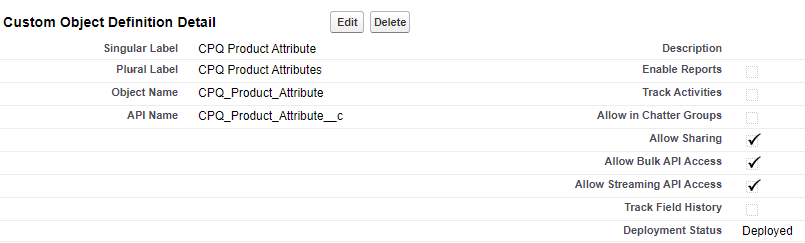
Step 2: Create the required fields in the CPQ Product Attribute object.
Step 3: Configure page layout and search layout.
Step 4: Create corresponding fields in the Quote Line Item object (SBQQ__QuoteLine__c).
Step 5: Add fields to the Quote Line field set.
Step 6: Create a Price Rule to copy List Price to Quote Line Item based on selected attributes.
Step 7: Create product attribute records:
- Create a product in Salesforce

- Set Price Book entry to 0
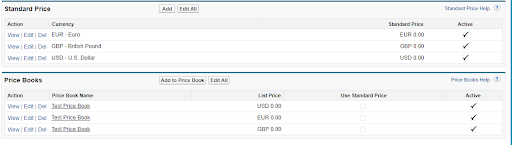
- Upload CPQ attributes using Data Loader

Step 8: Create an Opportunity and select the appropriate Price Book.
Step 9: Create a Quote and select the CPQ product. Attribute-driven pricing will populate automatically.

Real-World Use Case: Media Subscription Pricing
HTC Media Ltd publishes a magazine and a weekly newspaper with pricing based on language, size, and subscription duration.
| Product | Language | Size | Subscription | Price |
|---|---|---|---|---|
| Tech Info | English | Full | 3–12 months | $15–$7 |
| Tech Info | French | Full | 3–12 months | $18–$9 |
Without CPQ attributes, this scenario would require creating 32 separate product records. CPQ attributes eliminate this complexity.
Benefits of CPQ Pricing Based on Product Attributes
- Centralized product management
- Attribute-based reporting
- Easy campaign price updates
- Automatic price calculation
- Cleaner Quote Line Items
Conclusion
CPQ pricing with product attributes enables scalable, accurate pricing for complex products. It simplifies product management, improves sales efficiency, and ensures pricing accuracy in Salesforce CPQ.
About Girikon
Girikon is a trusted name in Salesforce consulting and implementation, helping enterprises design scalable CPQ and CRM solutions.
About Author

Nishtha is an ISTQB certified tester. She has sound knowledge on different types of testing mainly in the Manual, Web application, desktop application, database and Salesforce Testing. In her leisure time, she likes to sketch, read novels, and amazing facts on different topics.
Share this post on: