+1-480-241-8198
 +44-7428758945
 +61-1300-332-888
 +91 9811400594
With its capabilities such as automation, analytics, and AI-driven platform, among others, Salesforce has become every organization’s go-to CRM platform. However, to maximize its value, proper set-up is essential, otherwise, you risk increasing cost, low adoption, and fragmented processes. For a successful integration and adoption, you need an efficient Salesforce implementation roadmap, it’ll ensure the platform brings you desired business outcome rather than just becoming another underused tool. Rather than taking months to figure out workflows, what if we tell you the implementation can be done in 90-days only!
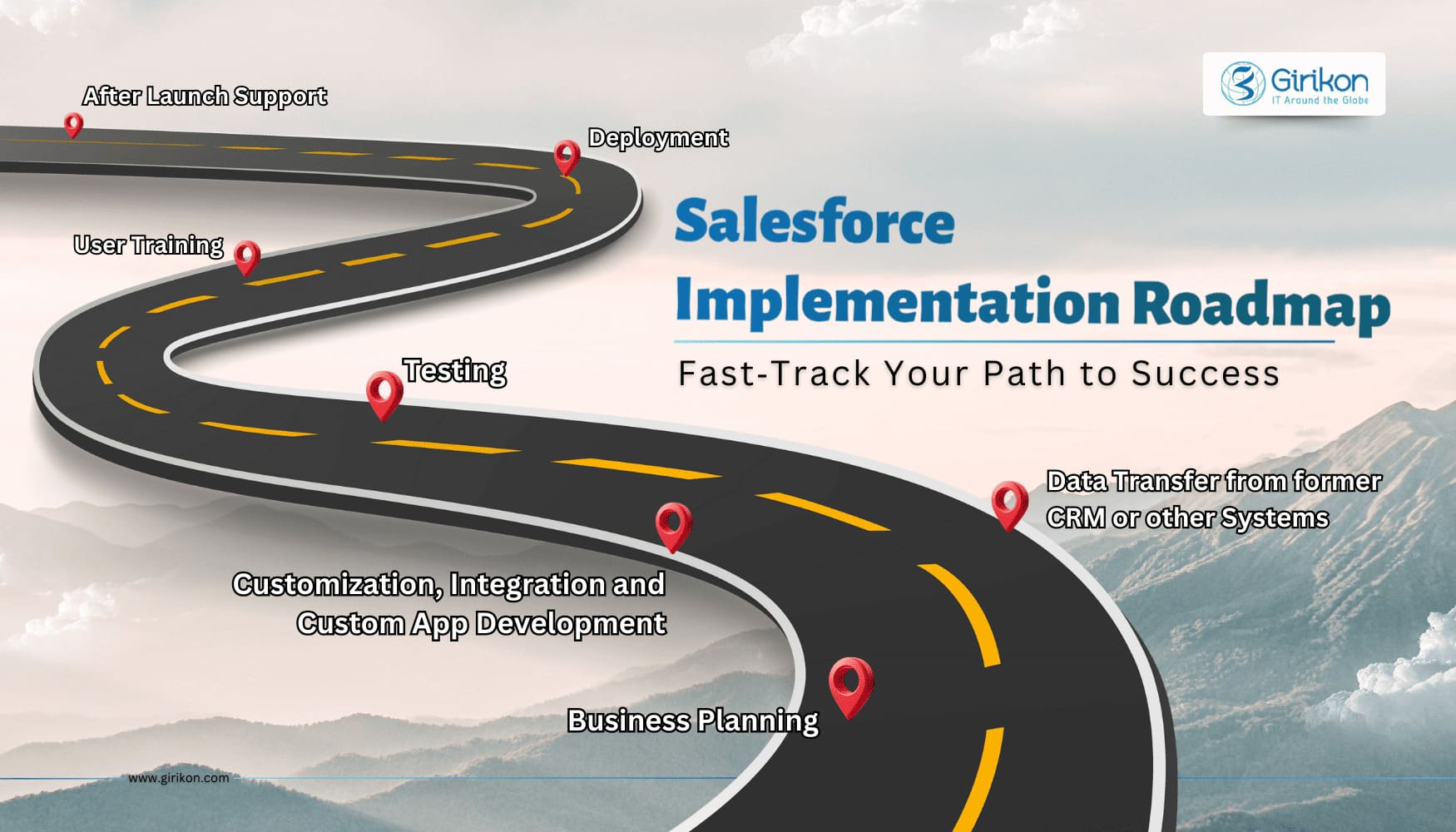
Why does a Salesforce 90-day implementation plan work? It does because the roadmap simplifies the process, is long enough to configure a solid foundation, but short enough to maintain urgency across departments. So, whether you’re already using Salesforce or just getting started, in this detailed implementation guide, we’ll help you get going. In this blog, we’ll explain what a 90-day roadmap looks like, why the timeline works, and in addition, a few common mistakes you should avoid while getting measurable value from day one of your Salesforce journey.
Why a Salesforce 90-day Implementation Plan Works
On paper, a 90-day timeline sounds urgent and nearly impossible as most Salesforce consulting partners take months to get it done. But this Salesforce 90-day implementation plan can help you build long-lasting and profitable customer relationships, faster and in an organized manner. It also offers other benefits, such as:
Keeps priorities sharp: In open-ended timelines, teams try to do everything in the first attempt only. A fixed timeframe forces clarity on what genuinely matters for launch and keeps the focus on that.
Limits unnecessary complexity: Some teams rush into advanced automations before getting basic data structure right. But a shorter cycle discourages that level of quick, over-engineering.
Creates early feedback loops: Users start working inside the system sooner without having to wait. They are also able to verify what works and what should be improved according to actual usage and not on presumption.
Supports structured change management: The departments know what is to be done, how and when it will impact them. So, adoption is smoother and go-live feels more controlled.
Shows value quickly: Leaders see reporting improvements, cleaner data, and more reliable forecasting sooner. With early results, projects get sustained investment and stakeholders’ support.
Salesforce Rollout Strategy Explained: What Does it Mean
To derive more value from an existing investment for your business, having a solid implementation roadmap gets you on the process. But the strategy should focus on these three areas:
- Data foundations
- Technical architecture
- Process design
How to Plan a Salesforce Implementation: A Phase-by-Phase Guide
When we say a 90-day Salesforce implementation roadmap, we’re not talking about jumping straight to configuration and go-live. You need a solid framework to keep the implementation on track, within budget and drive focus, accountability, and progress that you can track.
So, the Salesforce rollout strategy is divided between three phases, each one discussing different steps involved to get you going with clarity and momentum.
Phase 1 (Days 1–30): Discovery and Design
The goal here is clarity, so before making technical decisions, teams document what the organization truly needs from Salesforce. It’s also the stage where expectations are aligned with leadership, so priorities are clear from the very beginning.
1. Requirements & Workflow Understanding
Discussing with sales, operations, and leadership help map how leads progress, how deals move through stages, what reporting looks like, and what manual tasks slow people down. That becomes the basis for defining which configurations and automation belong in the first release.
2. Data Mapping & Cleanup
Every organization carries old, duplicate, or incomplete data, so before anything moves into Salesforce, data must be reviewed, standardized, and de-duplicated. This is done because clean data ensures reports and dashboards mean something.
3. Permissions & Security
User roles, profiles, and access rules need to reflect how information should be handled. Early permissions planning prevents awkward visibility problems later, especially around key accounts or sensitive information.
Phase 2 (Days 31–60): Build and Configure
This is where you work on your planning, keeping in mind not only the different stages but also that they work in sync. You start with the configuration that takes place in a sandbox, where logic and workflows can be tested without risking live data.
1. Object Model
New fields or custom objects are added to match how the business operates. A thoughtful object model helps reporting stay accurate as the system grows and evolves.
2. Process Automation
Start listing routine tasks like lead routing, assignment rules to stage reminders, everything needs to be automated wherever possible. Doing so, reduces manual work, brings consistency across teams, and keeps the pipeline moving without constant intervention.
3. Integrations & Testing
Customizing Salesforce to your specific workflows and processes, especially other tools such as marketing systems, accounting or ERP platforms. Next is to validate if data moves correctly, the systems stay aligned, and detect bugs or issues, if any and correct them before going live.
Phase 3 (Days 61–90): Deploy and Iterate
It’s a stressful time as you prepare users, migrate validated data, and get everything production-ready, the emphasis shifts to onboarding and confident use rather than configuration. Having IT support or a CRM implementation partner on hand can streamline this stage.
1. Data Migration
Cleaned and mapped data moves into Salesforce according to the plan. Test loads confirm accuracy and record ownership, which gives users confidence on day one.
2. UAT (user acceptance testing)
Users go through real-life situations to ensure that the system works as per the expectations. If there’s a mismatch and it doesn’t fit in the workflow, then you must rectify with quality assurance team before it is launched.
3. Training, Go-live Support & Iteration
These multi-layered steps let end users learn how to manage tasks, navigate dashboards, and track opportunities. Post-launch support keeps adoption strong and helps early questions get answered quickly. While evaluation and iteration process helps you get feedback from your team and keep customizing your CRM until it meets set expectations.
Who Owns What? Defining Roles for a Smooth Salesforce Rollout Strategy
When each member involved in the Salesforce implementation knows what their tasks are and they have clarity on their role in the plan, it leads to successful rollout. So, to ensure a smooth and shared accountability across several groups, include them:
Internal IT & Admins: Assist in bridging the gap between business requirements and technical architecture. They also help in directing the best practices and preventing architectural errors.
Salesforce Consultants or Partners: Help translate business goals into technical design while guiding best practices and avoiding architectural mistakes.
Business Owners: Establish guidance and support adoption requirements, as well as maintain the project on course.
Executive Sponsors: They provide direction, reinforce adoption expectations, and keep the project on track to meet organizational goals.
Mistakes to Watch For: Avoiding Risks in Salesforce Implementation
Even with a 90-day Salesforce deployment checklist, missteps are bound to happen. So, no matter, how perfectly you plan out your Salesforce implementation roadmap, you can’t avoid the pitfalls, but we can list out ways to mitigate the risks:
1. Unclear Success Metrics
Organizations should decide what success looks like before starting the Salesforce implementation roadmap. Whether it’s forecast accuracy, pipeline visibility, or reduced admin time, measurable goals keep decisions grounded.
2. Scope Creep
There is so much that Salesforce can build, which makes it businesses to do everything in one go. The leader needs to make a priority based on immediate value and schedule non-essential requests to subsequent releases.
3. Poor Data Quality
Do you know 97% of Salesforce teams collect a variety of data but only 24% are leveraging it properly? Poor data management leads to bad data that may cause inaccurate reporting or make processes redundant. Follow effective data management practices such as de-duplication, field standardization, and rules for ownership before migration.
4. Weak Adoption
Even a perfectly configured system doesn’t matter if users don’t use it correctly and effectively. Therefore, conduct reskilling or upskilling, and ensure your team has the right training and resources, leading to real adoption from day one.
5. Missing Documentation
Without documentation, knowledge stays in someone’s head, and over time, that becomes a major risk. Keeping records of rules, objects, fields, and workflows protects long-term maintainability.
6. Minimal Executive Involvement
Leadership endorsement is necessary, and they don’t have to be daily end-users, but their support and involvement ensure successful rollout. But they are important because they make sure everyone understands the need for the implementation, how it fits the overall business goal, and ultimately in reinforcing priorities and accountability.
Post-Go-Live Priorities for Smoother Salesforce Rollout Strategy
Implementation doesn’t end on launch day as the most valuable improvements come after users spend time working inside the system. So, your 90-day Salesforce deployment checklist must have these points too:
Continuous refinement: Oversee Salesforce processes and data quality and modify settings based on the changes in business operations to keep operations running effectively.
Feature enhancements: Deliver continuous Salesforce features through user feedback, automation, and analytics to make the most of the use and of the business results.
Release management: Make sure Salesforce updates and integrations are maintained at a disciplined level without causing any disturbance and still remaining compliant and stable in all environments.
Ongoing training: Present role-based Salesforce training sessions, including to validate adoption and enable effective usage of new features to achieve long-term productivity.
Top 7 Benefits of Hiring Salesforce Implementation Partner
Here are key benefits of choosing a Salesforce implementation partner for your CRM requirements:
1. Easy set-up and training increases user adoption rates, leading to more collaboration across the organization.
2. They ensure your CRM aligns with your business goals without going off-track on budget or the outcome you expect from the Salesforce implementation.
3. Offer continuous compliance and adjustments to the system, making it respond to dynamic environments as your business grows.
4. Proactive monitoring and maintenance assists in avoiding possible disruptions, enabling operations to go smoothly.
5. Quick resolution of issues during the implementation phase, ensuring a smoother transition.
6. In-depth understanding of the CRM platform’s complexities allows them to customize functions to the existing process, advance data processing and increase efficiency.
7. Strategic guidance on integrations allows seamless connection with other tools, enhancing overall system efficiency.
Closing Statement
Without a doubt, Salesforce CRM has been helping businesses personalize customer interactions, increase productivity, and support business growth. And a right strategy can help you reap these benefits as adoption happens sooner, and results start showing with minimal disruptions. This is having a 90-day Salesforce implementation roadmap is more than just a shortcut for faster results or set-up. The objective behind is to adopt a focused and disciplined approach to building a Salesforce foundation that works for the business without having to wait for months. When you give priority to adoption, data quality, and core workflows first, organizations avoid complexity that slows them down later.
In the end, the strategy is about how effectively your business can benefit from Salesforce, therefore focus on choosing the best CRM that works for you. In addition, make sure you have a reliable Salesforce Implementation partner that understands your business, supports your workflows requirements, and successfully finds you the right CRM. After all, with their expertise, the Salesforce consultants can effectively tailor CRM solutions, so they enhance your capabilities, fits your budget, and accelerates time-to-value.
FAQs
What is the Salesforce implementation roadmap planning process?
The key phases in Salesforce implementation of roadmap planning are discovery, customization, data migration, testing, and optimization. Always prioritize meeting business requirements over quick CRM wins, this ensures long-term value and reduces risks
How does a Salesforce partner enable fast deployment?
Partners use templates for 30-50% faster builds, and custom training helps to increase adoption. The right Salesforce implementation partner will manage change, prevent data issues, ideal for smooth Salesforce workflow documentation and rollout.
What is the Salesforce Data Cloud roadmap?
The process involves ingesting sources, unifying data, implementing governance, then deploying AI that takes 3-6 months on average. Always focus on connectors as it opens the door for real-time insights that are not available in the standard setups.
How long does it take to implement Salesforce?
It usually depends on your project requirements or scope with following timelines:
The Salesforce implementation partners usually build in sprints and provide MVP fast for early ROI and boost workflow efficiency.
- Basic Set-up: 1-3 months
- Enterprises Implementation: 6-12 months, depending on scope.
The Salesforce implementation partners usually build in sprints and provide MVP fast for early ROI and boost workflow efficiency.
What is your documentation and roll out the process of the Salesforce workflow?
We use Flow Builder for diagrams, sandbox training, phased pilots, and KPI monitoring. This helps us avoid making mistakes, add scalable automation value post-launch, and helps you realize the full potential of Salesforce AI without breaking banks.
About Author

Anjali is a technical content writer and strategist with 9 years of experience, bringing expertise in creation and strategy for IT services, software development, and Salesforce consulting companies. She excels at developing SEO-driven storytelling and technical narratives, and in crafting marketing assets that boost visibility, accelerate sales, and deliver measurable business growth.
Share this post on: